Are you losing sales because your checkout process is too long? Ever clicked “Add to Cart” then just left?
Yeah. Happens more than store owners like to admit. The truth is, every extra step in your checkout flow quietly pushes customers away. Not loudly. Just gone.
If you are running a WooCommerce store, this question matters more than you think. Should you stick with the classic cart flow? Or switch things up with something faster, like WooCommerce Quick Buy?
These days, more store owners are choosing to add a Quick Buy Button to WooCommerce Products to shorten the buying journey. Fewer clicks. Less thinking. More buying. Sounds simple.
But is it really better? Let us dig in. Not just features. Real behavior. Real outcomes.
What Is the Traditional Add to Cart in WooCommerce?
We all know it, the standard flow.
Customer lands on product → clicks “Add to Cart” → maybe browses more → eventually goes to checkout.
It is structured. Predictable. Safe. But here is the thing, it is also slow.
A user named Ali visits your store. He likes a shirt. Adds it to the cart. Then he sees another. And another. Suddenly, he’s comparing prices, opening tabs, and checking Instagram.
Ten minutes later? He is gone. Cart abandoned. That is the weakness. Still, it works. And it works well in many cases.
Why people Still Use Add to Cart:
- Customers can shop around freely.
- Encourages bigger orders.
- Familiar flow (no confusion).
- Works best for catalog-style stores.
But there’s friction. Always.
Where It Struggles:
- Too many steps.
- Distractions everywhere.
- Decision fatigue kicks in fast.
Honestly, people are impatient now.
What Is a WooCommerce Quick Buy Button?
Now imagine this instead. Same user. Same product.
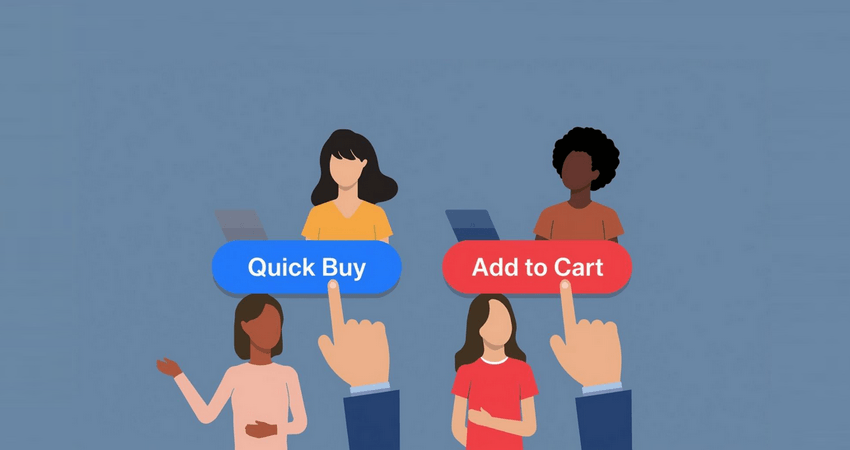
But this time, instead of “Add to Cart,” there is a Buy Now button. Clean. Direct.
He clicks, straight to checkout. Or even better, a pop-up appears. Payment. Done.
That is what a WooCommerce quick buy button does. It removes hesitation. It skips the middle. It is what people call:
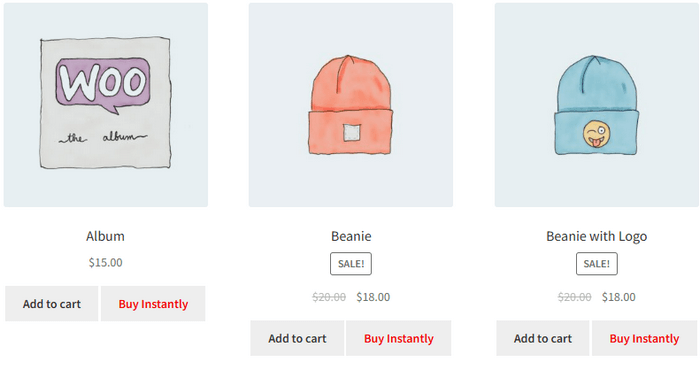
- Quick buy now button for WooCommerce.
- Direct checkout for WooCommerce.
And when you Add the Quick Buy Button to WooCommerce Products, you are basically saying: “Hey. If you are ready, just buy.” No detours.
Key Benefits of WooCommerce Quick Buy
Let’s not overcomplicate it. It is about speed. And intent.
1. Faster Checkout Process: Short. Direct. No extra pages. User clicks. User pays.
2. Reduced Cart Abandonment: Fewer steps = fewer drop-offs. Simple math.
3. Mobile Friendly: Thumb-friendly. No endless loading. Perfect for quick shoppers.
4. High-Intent Buyers Love It: Some users do not want to browse. They want to buy. Now. And this is where WooCommerce Quick Buy shines.
Add to Cart vs Quick Buy Button: Key Differences
| Feature | Add to Cart | Quick Buy Button |
| Checkout Speed | Slower | Instant |
| Steps | Multiple | Minimal |
| Conversion Rate | Moderate | Often higher |
| Shopping Behavior | Exploratory | Intent-driven |
| Best Use Case | Large stores | Focused offers |
| Mobile Experience | Okay | Smooth |
| Upsell Potential | High | Limited |
Which Converts Better? Short answer? It depends. Long answer? Let’s break it down.
When Quick Buy Wins
Imagine a customer comes from a Facebook ad. He already wants the product. He is not browsing. He is deciding. Now you show him:
- Add to Cart → Cart Page → Checkout → Payment.
Or:
- Buy Now → Checkout → Done.
Which one wins? Exactly. Quick Buy dominates when:
- You sell one main product.
- You run ad traffic.
- You target impulse buyers.
- You want direct checkout for WooCommerce.
In these cases, adding a WooCommerce quick buy button can dramatically improve conversions.
When Add to Cart Still Wins
Now flip the scenario. A user browsing a clothing store. Looking at shirts, jeans, and jackets. Comparing styles. Would he want to check out instantly? Probably not. He wants:
- Options.
- Time.
- Flexibility.
That is where: Add to Cart still performs better.
Best for:
- Multi-product stores.
- Discovery-based shopping.
- Upselling strategies.
So yeah. Quick Buy is not always the hero.
Hybrid Strategy: Best of Both Worlds
Here is what smart store owners do. They do not choose. They combine. Use Add to Cart for general browsing. Keep it there. It works.
Then, selectively Add Quick Buy Button to WooCommerce Products where it matters.
Like:
- Bestsellers.
- Trending items.
- Landing pages.
This way, you serve both types of users:
- The explorer.
- The buyer.
And honestly, that is where the real growth happens.
When Should You Add a Quick Buy Button to WooCommerce Products?
Not everywhere. That is a mistake. Be strategic. You should add a WooCommerce Quick Buy Button to products when:
- You notice high cart abandonment.
- You run paid ads.
- Your product solves a clear problem.
- Your audience is decisive.
Example?
A skincare product with strong reviews. A gadget trending on TikTok. A limited-time offer. In these cases, a quick buy now button for WooCommerce can push users to act instantly.
Impact on Mobile Conversions
Let us talk real behavior. Mobile users do not wait. They scroll fast. Decide faster. Leave fastest. With Add to Cart:
- Page loads.
- Cart opens.
- Checkout loads.
Too much. With Quick Buy:
- Tap.
- Checkout.
- Done.
That is why many stores use direct checkout for WooCommerce, specifically for mobile users. It just works better.
Common Mistakes to Avoid
Not everything about Quick Buy is perfect. People mess it up. Often. Here’s what to avoid:
- Removing Add to Cart completely.
- Ignoring product variations.
- Using a poor button design.
- Not testing performance.
Also, don’t assume it will magically increase sales. It needs a proper setup.
Tips to Maximize Conversions
A few small tweaks can change everything.
For Quick Buy:
- Use bold CTA text.
- Place it near the price.
- Make it stand out.
For Add to Cart:
- Add urgency.
- Show cart reminders.
- Offer bundles.
And always test. Always.
Conclusion
So, Quick Buy or Add to Cart? Honestly, it is not a battle. It is a balance. WooCommerce Quick Buy is powerful. Fast. Conversion-focused. Especially when used right. But Add to Cart? Still essential. Still relevant.
If your goal is speed and direct sales, then yes, use a WooCommerce Quick Buy button. Even better, strategically Add Quick Buy Button to WooCommerce Products where user intent is high.
If your goal is higher-order value and browsing experience, keep the traditional flow. Or better yet, combine both. Because in the end, the best store is not the fastest. It is the one that understands how people actually buy.
FAQs
1. Is WooCommerce Quick Buy better than Add to Cart?
Sometimes yes. Especially for fast purchases. But not always.
2. Can I use both together?
Yes. And you probably should.
3. Does Quick Buy work on mobile?
Very well. In fact, better than traditional checkout.
4. Will it reduce abandoned carts?
Often, yes. Fewer steps mean fewer exits.
5. Should I add Quick Buy to all products?
No. Be selective. Test what works.