Once you have launched your business on your WooCommerce website, your next step is to figure out how to reach more customers, grow your business, and increase sales.
Growing your business may sound daunting, but with the right tools, you can start working towards it easily.
The first step in growing your business is setting goals you want to achieve. The next step is to plan and strategize how you will achieve your goals.
You may start with coupon campaigns, email marketing campaigns, setting up an affiliate program, focusing on SEO for the website, etc.
The best part is that, whatever your strategy, you can find a good WooCommerce plugin to help you achieve your goals.
Key Takeaways
- WooCommerce is a powerful plugin that, with the help of the right plugins, can make your business grow and thrive.
- Choosing the right plugins can be daunting, but a well-defined goal and strategy can narrow down the plugins you need.
- It is easy to get overwhelmed by the sheer number of plugins available to promote your business. The key is to define your exact requirements and see which plugins best meet those requirements.
How To Pick the Right Plugins for Your WooCommerce Store
With the sheer number of plugins available, it is easy to get distracted and overwhelmed.
If you are in the process of shortlisting the right plugin, instead of trying out all of the plugins you find, the points below can help save you time in finding the right candidate right from the get-go.
These mostly apply to the free plugins from the WordPress directory.
- Check the support forum—plugins in the WordPress.org directory have a public support forum where you can check the issues the plugin users have experienced, how fast the support team has responded, and how quickly issues were resolved.
- Check the reviews—this will tell actual users’ experiences about the plugin and how the plugin team has dealt with the negative reviews.
- From the Advanced View page of the plugin, check its growth in terms of downloads. Older plugins can have a much greater number of active installations. But you may find a hidden gem among the newer plugins with more robust features, which may be indicated by the download growth.
- Check the last updated date of the plugin—you should always choose a plugin that is updated frequently.
- Check whether the plugin has good documentation. This can be in the form of videos or written documentation. However, the plugin must provide you with resources you can use if you encounter an issue.
- Also, check the last tested WordPress and WooCommerce versions.
- Third-party theme and plugin compatibility.
- Bloat—Many plugins come with features you may not even use, adding unnecessary code to your website.
Hand-picked Top 18 WooCommerce Plugins to Increase Sales
Below are some of the best WooCommerce plugins with free and premium versions. Most plugins listed are available from the WordPress.org plugin directory, and you can download them for free.
Smart Coupons for WooCommerce
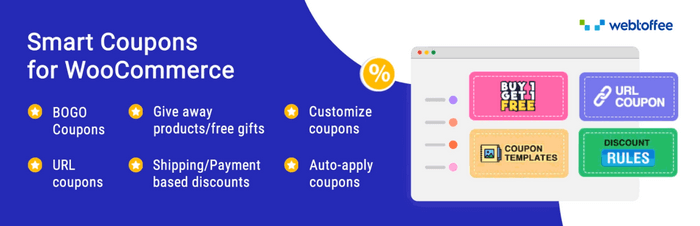
Smart Coupons for WooCommerce is a WooCommerce coupon extension that builds on the default WooCommerce coupon features to take them to a whole new level. It helps you create smart campaigns that will help you increase sales and become more loyal customers.
Coupon campaigns are sure to attract more customers to your store and increase your conversions. If your store is just starting, carefully creating discount campaigns can give you the right boost of customers.
Below are the key features of the plugin:
- Create an attractive BOGO coupon campaign. You cannot go wrong with a buy-one-get-one discount sale when converting customers.
- Apply coupons automatically. This reduces the friction for the customer in completing the purchase at the checkout stage, minimizing cart abandonments.
- Create coupon conditions to ensure your profitability. For example, create coupons that will only be applied with a minimum purchase of $100 for a certain category of products.
- Offer giveaways. This is one of the most popular forms of promotion, especially in the age of social media, and is likely to bring a lot of exposure to your store.
- Create a URL corresponding to a specific coupon. This makes it easy to create a coupon that can be easily shared via social media or email and redeemed with a click.
The plugin offers even more powerful features, including coupon customizations.
Features like store credits, advanced BOGO deals, etc., are provided in the WooCommerce Coupon premium plugin version.
The premium version costs $89 for a single site license, with higher plans available.
Stripe Payment Plugin for WooCommerce

WooCommerce comes with basic payment options, such as Cash on delivery and cheque payment, to complete a transaction in your store. You need to integrate other payment gateways, like Stripe or PayPal, to enable more convenient payment methods.
The WooCommerce Stripe plugin helps you easily integrate Stripe into your store and enable the different payment methods supported by Stripe. With the plugin, you can boost your customers’ confidence with 3D Secure and SCA-ready payment options.
Below are the features provided by the plugin to ensure a smooth payment process in your WooCommerce store:
- Enables you to create a checkout page hosted with Stripe with the Stripe Checkout feature.
- Supports multiple payment methods like SEPA, Afterpay/Clearpay, WeChat Pay, Klarna, Sofort, iDEAL, Google Pay, Apple Pay, etc.
- An overview dashboard to review all the payments in Stripe.
- Allow full and partial refunds on your store.
- Capture payments later.
The Stripe for WooCommerce plugin also has a premium version that offers more advanced features and supports subscription payments.
The price of the premium version of the plugin starts from $59/year.
Gift Cards for WooCommerce

Gift cards can be a great tool in your marketing arsenal. They are often shared among family and friends, thereby increasing the exposure to your store.
Customers often spend more on your store than the actual value of the gift card, thus helping to increase the average order value.
The Gift Cards for WooCommerce plugin allows you to create a gift card product that your users can purchase or share with their loved ones.
Below are the key features of the plugin:
- Create store credits that will be used up as the customers make more purchases.
- Create gift cards with predefined amounts.
- Allow customers to send gift cards via email, add custom messages, and send anonymously if they choose.
The free version of the plugin only allows you to create a single gift card product.
However, the paid version of this WooCommerce gift card plugin allows you to create unlimited gift cards with advanced features.
The paid version of the plugin comes at $99/year for a single site license.
RMA Return Refund & Exchange For WooCommerce Pro

WooCommerce RMA Plugin is a solution that makes returns, refunds, exchanges, and cancellations seamless for both customers and store owners.
Customers may easily request WooCommerce refunds, exchanges, and cancellations with the WooCommerce RMA plugin. The best part is the notifications for each state that will be sent by customizing the email content accordingly.
Below are the key features of the plugin:
- Allow customers to cancel the made return/exchange requests.
- Efficient and accurate product inventory management.
- Admin can set a specific time frame for all refund, exchange, and cancellation requests.
- Utilize the RMA Report functionality to get overall insights into refunds, returns, exchanges, and cancellations across the website.
- Create a partial WooCommerce refund, exchange, or cancellation without any hassle.
WooCommerce returns plugin also has a premium version that offers even more advanced dynamic functionalities.
The premium version of the WooCommerce returns plugin is priced at $69/ year for a 1-site plan.
Variation Swatches for WooCommerce
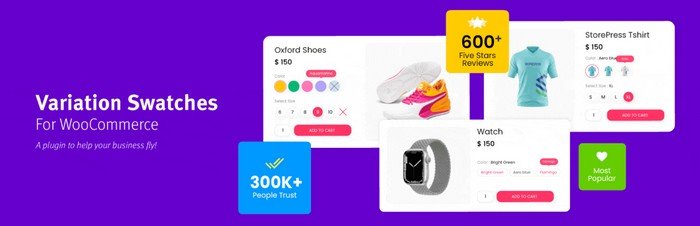
When you have variable products in WooCommerce, most WooCommerce themes show these variations on the product page as drop-downs.
This does not always make for a good experience, especially when the product has more than one attribute and variation. It also reduces the visibility of the variations.
This is where this WooCommerce variation swatches plugin is significant. It shows all the product variations and attributes in swatches, which makes it easy for customers to choose from the different options of the product.
Also, customers are readily presented with the options they have, potentially reducing their decision-making time.
Below are the key features of the plugin:
- Create button, image, color, text, or label swatches.
- Indicate the variation’s unavailability with a cross or by blurring out-of-stock products. You can also hide the variations that are out of stock.
- Add tooltips for variations.
- Compatible with most theme builders and popular plugins.
The WooCommerce variations swatch plugin comes with the premium version, with advanced capabilities.
The Premium version of the Variation Swatches for WooCommerce plugin is originally priced at $99 for a single site with a yearly subscription plan. Higher and lifetime plans are available.
Gift Cards for WooCommerce Pro
Gift Cards for WooCommerce Pro is a comprehensive plugin designed to enhance WooCommerce stores by enabling the creation, sale, and management of gift cards.
It offers over 20+ festive templates, allowing users to generate customizable gift cards that can be personalized with messages and images.
The plugin supports various redemption methods, including QR codes and barcodes, making it easy for customers to redeem their gift cards online or in retail settings.
Key Features:
- Customizable Gift Cards: Personalization options for messages and images.
- Group Gifting: Allows multiple contributors to fund a single gift card.
- Multiple Redemption Methods: QR codes and barcodes for quick redemption.
- Gifting Portal: A dedicated platform for scanning, recharging, and redeeming gift cards.
- Email and SMS Sharing: Send gift cards via email, WhatsApp, or SMS.
- 20+ Festive Templates: A variety of templates for different occasions.
- Offline Gift Cards: Ability to sell and manage offline gift cards.
- Import/Export Functionality: Easily manage gift card data through CSV files.
- Flexible Delivery Options: Options for email delivery, downloadable PDFs, or physical shipping.
The pricing for Gift Cards for WooCommerce Pro starts at $89 per year. Users can also take advantage of promotional discounts during sales events. They can also download the plugin’s free version on WordPress.org.
Advanced Shipment Tracking for WooCommerce
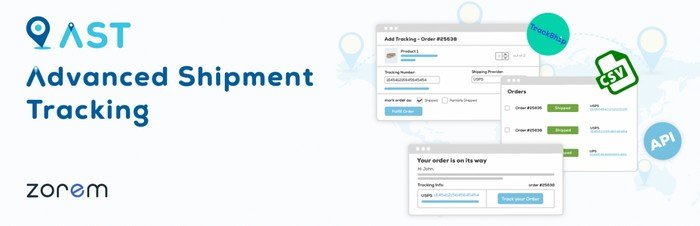
Once an order is placed and shipped, being able to track the item until it is reached is imperative for a good customer experience.
Advanced Shipment Tracking for WooCommerce allows your customers to add tracking information to orders. The AST plugin integrates with major shipping providers easily, allowing you to keep your customers happy.
Below are the major features of the plugin:
- Associate an order tracking number with each order.
- Depending on an order’s shipment status, AST can add two more statuses to a completed order in the backend—shipped or partially shipped. The partially shipped status indicates if the order contains multiple items and only a few of them are shipped.
- The plugin also allows you to add multiple tracking numbers to the same order.
- The plugin integrates with major shipping companies. The tracking link provided by the widget or in the email redirects to the shipping company’s tracking page.
The Advanced Shipment Tracking plugin also comes with a paid version that provides advanced dashboards such as a fulfillment dashboard, assigning different tracking numbers to different items, and more.
The AST Pro plugin starts from $129/year to be used on a single site.
Fluid Checkout for WooCommerce – Lite

How you optimize the checkout on your WooCommerce store is crucial and can make or break your conversions. Sometimes, removing a few fields on the checkout page itself can make a huge difference and can increase your conversions.
Progressive disclosure using a multi-step checkout can also drastically increase the UX of your checkout.
The Fluid Checkout for WooCommerce plugin helps you get the most out of your checkout flow. The plugin knows exactly how important it is to keep customers at checkout and provides features that reduce friction and help them complete their checkout.
Below are the plugin features that can help your checkout flow be optimized for maximum conversions:
- Create a responsive checkout layout to ensure that conversion is not affected by any screen resolution.
- Allows you to create a single-step or multi-step checkout.
- It allows you to hide any optional fields so that there are fewer fields for customers to fill out.
- Give instant feedback on fields if the value entered is different than expected. This helps the customer to make corrections right away rather than when pressing the submit button.
- To boost your customers’ confidence, add trust badges, such as secure payment, reviews, etc.
- Help customers log in without leaving the checkout page.
The features in the free plugin are very powerful to make a drastic change in converting your traffic into paying customers.
The paid version of the Fluid Checkout plugin provides more features that will increase the customer experience in your store.
The paid version of the plugin comes at a price starting from 99 EUR per year for a single site.
Price Based on Country for WooCommerce
If you serve customers in multiple countries, it is a no-brainer that providing them with payment options in their local currency is very convenient.
Not only does this improve the customer experience, but it also drastically reduces the customer’s decision-making time and increase sales.
The Price Based on Country plugin detects the customer’s country and changes the currency automatically. It uses WooCommerce’s geolocation feature.
The plugin has the following features to enable you to have a multicurrency checkout:
- Set the price of the products based on the exchange rate or set the price manually according to the currency.
- Change currency when the country is selected at the checkout.
- The customers can also change the currency by changing the country in the country switcher widget.
The Price Based on Country for WooCommerce currency switcher plugin also has a paid version. This gives you more flexibility, especially in terms of exchange rates.
The paid plan comes at $59/year for a single site.
Subscriptions for WooCommerce

The eCommerce world has shifted gears towards subscription models, which are continuously growing business models. Subscription models allow for a convenient business model for customers and provide recurring revenue for store owners.
The Subscriptions for WooCommerce plugin helps you create a separate product type for subscriptions in addition to the four default product types available in WooCommerce.
With the integration of a payment gateway that supports recurring payments, you can successfully launch a subscription business with your WooCommerce store.
Below are the main features of the plugin:
- Create simple subscription products with any intervals like yearly, monthly, or weekly.
- Set free trials and sign-up fees for purchasing a subscription product.
- Sent basic emails related to subscription renewals.
- Compatible with PayPal and Stripe.
- Option for canceling the subscription for customers.
The free version of the Subscriptions for WooCommerce plugin is a great starting point to get started with the subscription model.
For more advanced features, the plugin also offers a paid version.
The paid version costs $129/year for a single site license.
Affiliates Manager

Affiliate programs are proving to be a great marketing strategy, especially in the age of digital influencers. With an affiliate program, you can get people to promote your product and earn a commission for every sale they make.
You can easily launch your affiliate program with the help of the Affiliates Manager plugin. The plugin will help you onboard affiliates, create a link, and manage their payouts.
Below are the key features of the plugin that will allow you to create an affiliate program in your WooCommerce store:
- Automatic or manual approval of affiliates when they apply for your affiliate program.
- Different commission rates for different affiliates help you to attract the bigger influencers with a higher commission or reward the affiliates that bring the most sales.
- Pay your affiliates using PayPal or make a manual payment and mark them as paid.
- Provide unlimited creatives for your affiliates that they can use to promote your products.
- Set how long the cookie for a referral will be set for.
Product Feed for WooCommerce

Selling your products on multiple platforms is a very good way to increase their reach to a wider audience.
Platforms like Facebook Shop and Google Shop can provide increased visibility, quality traffic with an intent to purchase, a seamless shopping experience, increased trust and credibility, etc.
The Product Feed for WooCommerce plugin connects your store with multiple shopping listing platforms, allowing you to reach customers where they are.
Below are the main features of the plugin:
- Create product feeds in XML, CSV, XLSX, and TXT formats for Google Merchant Center, Facebook, Instagram, TikTok Ads, Pinterest, Snapchat, Bing, etc.
- Easily sync your products with Facebook Shops.
- Map your store’s product categories with those of Facebook Shops and Google Shops.
- You can control the feed by adding static values, filtering which product categories to add or remove, and more.
This WooCommerce product feed plugin comes with a paid version that supports even more channels than the free version.
The Product Feed for the WooCommerce plugin comes at $89 for a single site license.
Customer Reviews for WooCommerce

When someone purchases from your store, one of the most important pieces of information they look for is customer reviews. Social proof in the form of reviews is a very powerful tool for influencing the customer’s purchase decision.
The Customer Reviews for WooCommerce plugin should be a must-have in your store, given how important customer reviews are and how difficult they can be to obtain.
If you have great products, you are bound to get reviews from your customers organically. However, it will take time for the organic reviews to build to a significant number.
The solution to that is simple – just ask and remind the customer to leave an honest review if they like your product or service.
Below are some of the features that can help you increase the number of reviews on your store:
- Send an automatic review request email after a set interval of the purchase.
- Integrate the reviews with Google Shopping for better CTR and conversions.
- Incentivize customers to share feedback as reviews by creating coupons for them.
- Allow customer to add photos or videos to their reviews.
- Add a ‘verified customer’ badge to reviews to build customer trust.
The Customer Review for WooCommerce plugin, or Cusrev plugin, also has an advanced set of customization features in its paid version.
You can get the advanced features of the Cusrev plugin at $59.99/year or pay $7.99/month.
YITH WooCommerce Wishlist
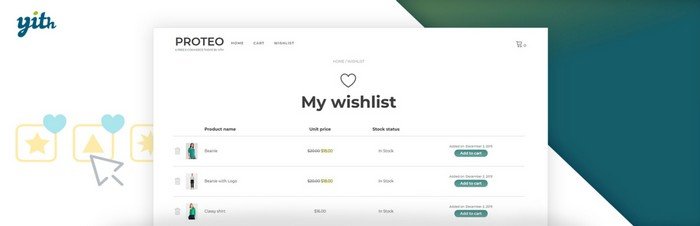
Wishlist are a great feature to add to a store for customers as they help customers save products they can purchase later. The wishlist features also encourage repeat customer visits to your store.
Wishlists are more than just a customer-friendly feature a store can have, it is a goldmine of data. It will help you understand the customer trends, what products customers like, and which they don’t, etc.
They can also be used for personalized campaigns to encourage customers to purchase the products they have added to their wishlists.
YITH WooCommerce wishlist plugin is a versatile wishlist plugin that can help you set up an ‘add to wishlist’ button for your products and create a wishlist page.
Below are the major features of the plugin:
- Allow customers to add specific variations of products to the wishlist.
- Insert an ‘Add to wishlist’ button using a shortcode anywhere your product is listed on your store.
- Insert a ‘Remove from wishlist’ button when the product is added to the wishlist.
- Create a page to show the products in the wishlist.
YITH WooCommerce Wishlist also has a premium version with more powerful features, allowing customers to create multiple wishlists and send promotional emails for the products added to the wishlist.
The YITH WooCommerce Wishlist plugin comes for $99.99/year.
RankMath

Although not strictly a WooCommerce extension like the rest of the plugins added to this list, RankMath is a plugin you can avoid using in your store.
SEO is an important part of increasing the number of visitors to your customers to your store and thereby increase sales.
RankMath is a fast-growing, lightweight, and feature-rich SEO plugin you can use for your store. This plugin comes with all the basic SEO requirements for a website set as default, so you are ready to go.
Of course, you can change the settings if you want to depending on your store’s needs.
Below are some of the powerful features that the plugin provides:
- Support for multiple schema markups to increase your visibility on search engines.
- Credit-based content AI can help you create optimized content for search engines with the help of AI.
- Optimize for an unlimited number of focus keywords.
- Integration with Google Search Console and Google Analytics.
The free version of the plugin has many more useful features than can be listed here. In addition, the plugin provides more sophisticated features in its paid version.
The paid version comes at $98.98/year.
MailChimp for WooCommerce

Email marketing continues to be one of the best marketing tools available for online businesses.
It is considered one of the best alternative traffic sources to organic search traffic since you are not susceptible to the fluctuations that search algorithms can cause. So, it is highly recommended to start building an email list as early as possible.
MailChimp is an early player and has become almost synonymous with email marketing. Unlike other plugins in the list, MailChimp is a SaaS platform.
The MailChimp for WooCommerce plugin helps you integrate your store with the service.
Below are the features you have at your disposal when you integrate MailChimp into your WooCommerce using the plugin:
- The plugin syncs all your WooCommerce customer data with MailChimp.
- You can obtain the consent of the users with an opt-in checkbox at the point of data collection.
- Create audience segmentation and create email campaigns for that specific segment.
- Send cart abandonment emails.
- View details about click rate, bounce rate, open rate, conversion rate, etc. on the MailChimp dashboard.
MailChimp has even more features that can make your email marketing more effective. The paid plan of the service not only offers more advanced features but is also needed if the number of audiences exceeds a certain threshold.
The paid plan can vary depending on the number of contacts you have in your contact list. The plan starts from $6.84/month/500 contacts.
Product Recommendations for WooCommerce
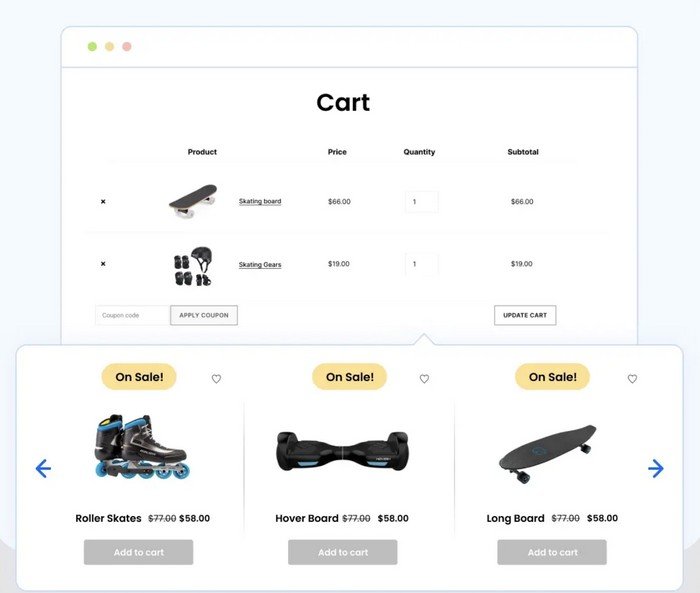
Once your customers have landed on your website and browsed through the products, you can keep them engaged on your website and simultaneously increase the visibility of other products on the website through relevant product recommendations.
The Product Recommendations for WooCommerce plugin helps you create upsells and cross-sells on your website with relevant product recommendations. There are different kinds of product recommendations you can create using this plugin, including custom ones that work best for your store.
Below are the features that help you make the most out of your website visitors with product recommendations:
- Create different kinds of product recommendations, including, but not limited to, Related products, best sellers, frequently bought together, new arrivals, recently viewed, trending products, hot sellers, and more.
- Show the products in sliders or a grid.
- Hide products that went out of stock.
- Create custom recommendations and decide how you want to display the products.
You can get all the plugin’s features at $89/year for a single site.
Wholesale for WooCommerce
Wholesale for WooCommerce allows wholesale owners to enhance their stores’ functionality and performance in the right direction. This impressive plugin suits small and large businesses and caters to the needs of wholesale and retail customers.
The good thing about the Wholesale for Commerce plugin is its simplicity. You can easily install it into your WooCommerce store without coding.
Wholesale for WooCommerce enables businesses of various sizes to retain and expand their customer bases, increase sales, and revenues.
Key Features:
- The plugin lets businesses smartly manage WooCommerce wholesale pricing for single and variable products.
- Businesses can customize prices and discounts for wholesale customers depending on their assigned user role.
- Apply global, category, and product-specific discounts to fulfill diverse business needs.
- The plugin allows businesses to simplify the user management process.
- Small or large businesses can develop a private yet results-driven WooCommerce store for wholesale customers.
The plugin costs $10.75/month and $129/year.
Concluding Remarks
In conclusion, growing your WooCommerce-based business is achievable with the right strategies and tools. Set clear goals and use marketing techniques like coupon campaigns, email marketing, SEO, and affiliate programs to expand your reach.
WooCommerce plugins can greatly simplify these efforts.
Selecting the right plugins is essential. Focus on user reviews, support forums, update frequency, and compatibility to find the best tools.
Powerful plugins like Smart Coupons for WooCommerce and WooCommerce Gift Card, from WebToffee can enhance operations and customer experience.
With strategic planning and the right plugins, you can drive business growth and succeed in the competitive eCommerce landscape.
Disclosure: We sometimes use affiliate links in our content. Some of the links in this post are “affiliate links.” It means if you click on the link and purchase the item, we will receive an affiliate commission. It helps our website keep on running and allows us to offset our writing team’s costs. Thanks for your support.