
If you have been running a WordPress website for some time, you have probably battled with spam, whether it’s junk comments, fake contact form submissions, or malicious links.
Left unchecked, spam not only wastes your time but also clutters your site and can even harm your SEO.
That’s where Akismet, one of the best anti-spam plugins for WordPress, comes in. But is it still worth using in 2025?
In this guide, we’ll break down what Akismet is, how it works, how to set it up, and why it remains the best anti-spam plugin and solution for millions of website owners.
What Is Akismet?

Akismet is an anti-spam plugin developed by Automattic, the same team behind WordPress.com, WooCommerce, and Jetpack.
Launched in 2005, Akismet has since blocked over 500 billion spam comments.
As WordPress co-founder Matt Mullenweg said when announcing Akismet:
“Akismet is a new web service that stops comment and trackback spam. (Or at least tries really hard to.) … when people tell you they’re able to spend more time with their family because they’re not spending 30 minutes a day dealing with spam it really puts things in perspective.”
It works by automatically filtering out spam from comments and contact forms using advanced algorithms and a massive, ever-learning spam database.
TL;DR: It’s like a spam-fighting bodyguard for your site that works 24/7 in the background.
Key Features of Akismet
Automatic Spam Detection
Akismet includes great features and scans every comment and form submission on your site in real-time, using an algorithm that detects patterns commonly associated with spam.
This helps prevent malicious or unwanted content from reaching your moderation queue, saving you valuable time and keeping your site clean automatically.
Global Spam Database
The data Akismet checks is compared against its global spam database, which is constantly updated by millions of websites.
This collective intelligence allows Akismet to identify spam even from brand-new sources, offering a level of protection that improves over time as more sites contribute to the network.
Comment History
Akismet keeps a detailed record of every comment it processes, indicating whether it was approved, marked as spam, or flagged for manual review.
This history makes it easy to track false positives, restore legitimate comments, or refine your spam protection settings as needed.
URL Detection
Spammers often hide malicious links within comments and form fields.
Akismet automatically analyzes submitted URLs, looking for signs of phishing, malware, or keyword-stuffed backlinks.
It flags anything suspicious, so you don’t have to worry about your visitors clicking harmful links.
Plugin Integration
Akismet works with many of the most popular WordPress plugins, including Contact Form 7, Jetpack, Gravity Forms, and WooCommerce.
Whether you’re collecting form data, customer reviews, or blog comments, Akismet seamlessly integrates and filters spam across multiple touchpoints on your site.
How Akismet Works Behind the Scenes
When a visitor submits a comment or fills out a form on your WordPress site, Akismet immediately jumps into action behind the scenes, without slowing down your site or affecting the user experience.
It quietly and efficiently analyzes each submission based on a combination of signals, including:
- IP Address: Helps identify known spammers or suspicious networks that have previously been flagged across the internet.
- Comment Content: Scans the actual words, links, and formatting to detect spammy language, excessive links, or keyword stuffing.
- User Behavior Patterns: Monitors submission speed, repetition, and anomalies that are common with bots or automated spam tools.
- Global Spam Reports: Compares the submission against real-time data collected from millions of WordPress websites that are also using Akismet, allowing it to detect new spam trends faster than traditional tools.
If Akismet detects anything suspicious, like a comment with hidden links, irrelevant keywords, or behavior typical of spam bots, it either automatically marks the content as spam or holds it for your moderation, depending on your settings.
The best part? Akismet is constantly learning. Thanks to machine learning and crowdsourced data, the plugin improves its accuracy every day.
As more sites flag spam, the algorithm becomes sharper, making it one of the smartest and most adaptive tools available for WordPress.
How to Set Up Akismet on Your WordPress Site
Setting up Akismet is quick, painless, and requires no technical knowledge, making it a favorite among beginners and also experienced WordPress users.
In just a few minutes, you can start filtering spam automatically and take a huge step toward keeping your site secure and clutter-free.
Install the Plugin
From your WordPress dashboard, go to Plugins > Add New, then type “Akismet” into the search bar. Once it appears, click “Install Now” followed by “Activate.”
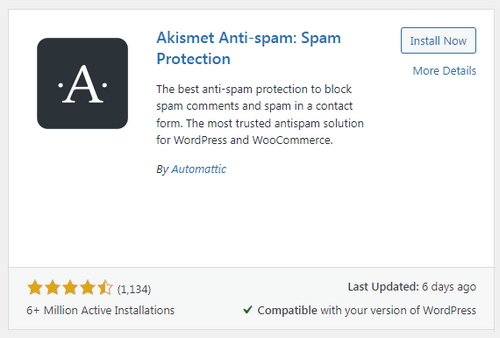
Akismet is an official WordPress plugin, and one of the best anti-spam plugin so you can trust that it’s reliable, secure, and well-maintained.
Download Akismet from WordPress.org
Choose Your Plan
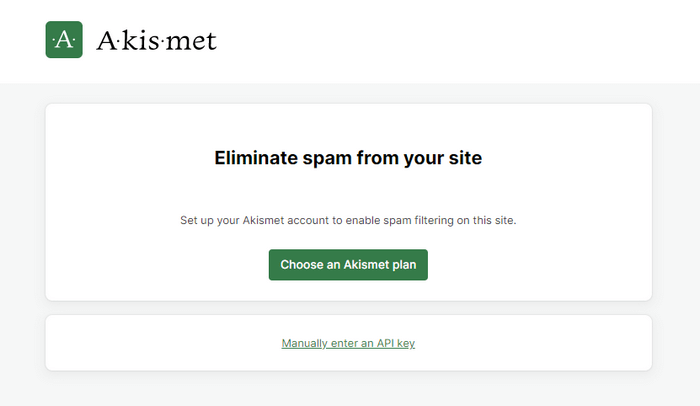
Akismet offers flexible plans depending on your needs.
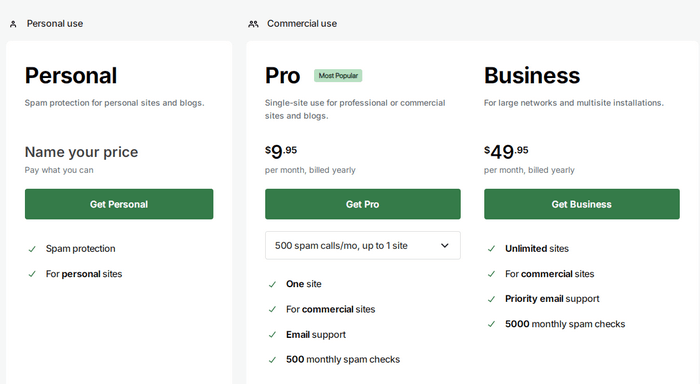
For business or commercial websites, you’ll need to upgrade to a paid plan to comply with their terms of service.
Paid plans also come with enhanced features and support, worth the investment if you’re running a professional site that handles high volumes of comments or form submissions.
If you’re running a personal or hobby blog, the free version is usually all you need.
Activate and Get an API Key
After activation, Akismet will prompt you to connect your site to the Akismet service by signing up at Akismet.com.
You’ll be asked to create an account and generate an API key, a unique code that allows your site to communicate with Akismet’s spam-detection servers.

Copy and paste the key into the plugin settings on your WordPress dashboard to enable full functionality.
Configure Your Settings
Once your API key is active, head into Settings > Akismet Anti-Spam to fine-tune how the plugin behaves.
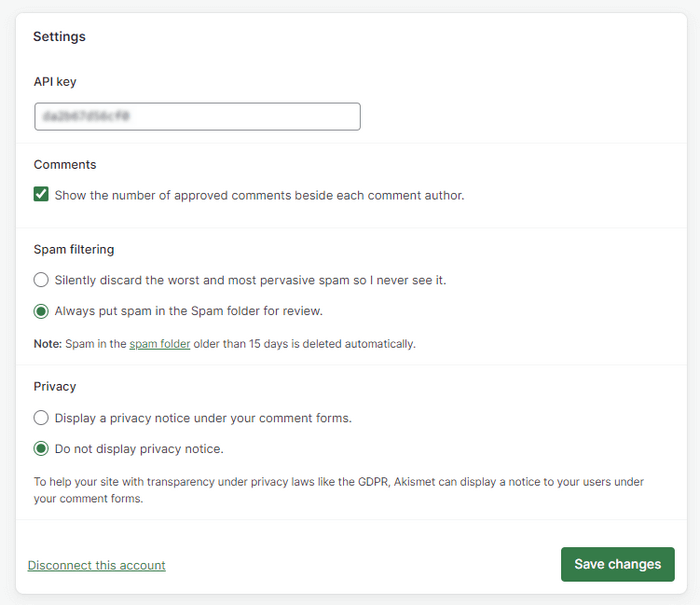
You can choose to:
- Automatically discard the worst and most obvious spam.
- Keep a detailed comment history to review what Akismet has filtered.
- Display a privacy notice to comply with GDPR and other regulations.
These settings help you customize the experience to your site’s specific needs without compromising on protection.
With those simple steps, Akismet will be fully operational, quietly working behind the scenes to defend your website.
It’s one of the easiest ways to add powerful, intelligent spam protection and solidify your use of the best anti-spam plugin available for WordPress.
Akismet Pricing: Free vs. Paid Plans
| Plan | Price | Best For |
| Personal | Free | Non-commercial blogs. |
| Pro | $9.95/month | Single-site use for professional or commercial sites. |
| Business | $49.95/month | For large networks and multisite installations. |
| Enterprise | Get a quote | Unlimited sites, Dedicated support, Custom spam check allowance. |
For many users, the free plan is more than enough. But if you’re running a business, it’s worth investing in premium protection.
Pros and Cons of Akismet
Like any tool, Akismet comes with its strengths and a few minor limitations.
Understanding these can help you decide if it’s the right anti-spam plugin for your WordPress site, and for most users, it is.
Pros
Easy to Set Up and Forget: Akismet is user-friendly, from installation to activation, the process takes just a few minutes, and once it is set up, you rarely need to touch it again.
It works silently in the background, saving you time and frustration by handling spam automatically.
Powerful Real-Time Spam filtering: Akismet scans every comment and form submission as it happens, identifying spam with impressive speed and accuracy.
This real-time protection is one of the key reasons it remains the best anti-spam plugin on the market.
Works with Major Plugins and Themes: Whether you’re using Contact Form 7, Jetpack, WooCommerce, or Gravity Forms, Akismet integrates easily.
It’s also compatible with most WordPress themes, so you don’t have to worry about styling conflicts or performance issues.
Lightweight — Doesn’t Slow Down Your Site: Unlike some security plugins that bloat your site or increase load times, Akismet is fast and efficient.
Its cloud-based processing ensures that your server resources are not bogged down, keeping your website running smoothly for your visitors.
Cons
Requires API Key Registration: To activate Akismet, you’ll need to sign up at Akismet.com and retrieve an API key.
While this is a quick and free process for personal users, it may be a slight inconvenience for those who prefer plugins with instant activation.
Occasional False Positives (Though Rare): While Akismet is highly accurate, no spam filter is perfect.
Sometimes a legitimate comment is mistakenly flagged as spam. Thankfully, you can always review the spam queue and restore real comments with a click.
Commercial Sites Require a Paid License: If your site is monetized or used for business purposes, you need to opt for a paid plan.
Although the cost is reasonable and includes enhanced protection, it’s worth noting for budget-conscious users or small startups.
Akismet vs. Other Anti-Spam Plugins
While there are several contenders for the best anti-spam plugin, here’s how Akismet stacks up:
| Plugin | Strengths | Weaknesses |
| Akismet | Reliable, backed by Automattic, smart AI. | Requires API key, paid for commercial use. |
| Antispam Bee | Free, GDPR compliant. | Not ideal for large-scale spam. |
| CleanTalk | Cloud-based, detailed stats. | Subscription required. |
| WP Armour | Honeypot-based, no captcha needed. | Less effective against bots. |
For most WordPress users, especially beginners or those short on time, we recommend Akismet.
Extra Tips for Fighting Spam (Beyond Akismet)
While Akismet does a fantastic job defense against spam, combining it with a few additional tactics can significantly boost your website’s overall protection.
Think of it like locking your front door and also installing a security camera; layered protection is always smarter.
Here are a few practical, easy-to-implement tips to help you stay one step ahead of spammers:
Enable Comment Moderation for First-Time Commenters
This is a simple but effective method. WordPress allows you to hold comments for moderation until a user has had a comment previously approved.
This helps prevent bots and spammers from flooding your comment section and gives you manual control over what gets published the first time.
Add reCAPTCHA to Login and Contact Forms
reCAPTCHA is a well-known tool from Google that helps verify whether a user is human.
By adding reCAPTCHA to your login, registration, and contact forms, you add an extra layer of bot protection, especially against brute force login attempts and spammy form submissions.
Plugins like WPForms and Contact Form 7 support reCAPTCHA out of the box.
Disable Comments on Older Posts
Spam bots often target older, high-ranking blog posts that no longer get much attention from their owners.
By disabling comments on posts after a certain number of days (say, 30 or 60), you reduce the attack surface dramatically.
This can be easily configured in your WordPress settings under Discussion > Automatically close comments on articles older than X days.
Limit the Number of Links Allowed in Comments
Most spam comments include multiple links, often irrelevant, malicious, or SEO-manipulative.
By limiting the number of links allowed in a comment, you make your site less attractive to spammers and reduce the risk of link-based attacks or SEO penalties.
When combined with Akismet, these best practices form a multi-layered, proactive approach to website security.
They not only reduce spam but also improve user experience, site cleanliness, and trustworthiness in the eyes of both visitors and search engines.
If you’re serious about keeping your site safe, clean, and professional, adopting these practices along with using Akismet as your best anti-spam plugin is a no-brainer.
What do Leading Bloggers and Blogs Say About Akismet?
Leading bloggers and WordPress blogs consistently recommend Akismet for its spam detection and hassle-free setup.
ProBlogger’s Darren Rowse credits it with saving him months of work.
EscapeCreative calls it a must-have plugin for any site that accepts comments, making it clear why Akismet remains the best anti-spam plugin for WordPress.
From WP101’s 2025 Anti-Spam Guide:
Akismet remains my go‑to first line of defense for several reasons. … It works silently in the background without slowing down your site. And perhaps most importantly, it catches spam before it ever hits your dashboard.
From WPBeginner’s 2025 plugin roundup:
Trusted by 100+ million websites, Akismet is a popular WordPress anti‑spam plugin.… It can spot spammy comments off the bat… automatic spam deletion… detailed stats to see how much spam Akismet has blocked.
Darren Rowse (ProBlogger) – In an honest “love–hate” review:
I love Akismet – it’s a WordPress tool that has literally saved me months of work. It has blocked 4,059,113 comment spams on ProBlogger alone over the last year or two – something that I will be forever grateful for!
Final Verdict: Is Akismet Still the Best Anti-Spam Plugin?
Akismet continues to earn and defend its title as the best anti-spam plugin for WordPress.
With its powerful real-time filtering, smart machine-learning technology, and seamless integration with the WordPress ecosystem, it remains the best solution for anyone serious about keeping their site spam-free.
It is not only easy to install and manage, but also scalable, whether you’re running a blog with a few weekly comments or managing a high-traffic business site that receives hundreds of form submissions daily.
The fact that it’s built and maintained by Automattic, the creators of WordPress itself, only adds to its credibility and long-term reliability.
Whether you’re a blogger, freelancer, or have a business, securing customer interactions on your site, Akismet helps you focus on what truly matters: creating content, engaging your audience, and growing your brand, without the constant headache of moderating spam.
If you’re searching for a proven, dependable, and intelligent spam solution in 2025, Akismet isn’t just a good option; it is still the best anti-spam plugin you can get for WordPress.
Disclosure: We sometimes use affiliate links in our content. Some of the links in this post are “affiliate links.” It means if you click on the link and purchase the item, we will receive an affiliate commission. It helps our website keep on running and allows us to offset our writing team’s cost. Thanks for your support.