Google has always used different metrics to measure the quality of indexed websites. However, in 2021, they introduced the concept of Core Web Vitals to more precisely ascertain the quality of website user experience.
Naturally, the metrics collectively known as Core Web Vitals impact SEO. With that in mind, we’ve compiled a detailed guide explaining Core Web Vitals and how they impact your SEO rankings.
What Are Core Web Vitals?
When ranking websites, Google’s goal is always to have genuinely better websites rank higher. Of course, “better” is a broad and subjective term for websites.
In practice, two broad categories of factors can make a website “good” or “bad”:
- The quality of the website’s content.
- The quality of the website’s user experience.
With Core Web Vitals, Google wants to quantify the latter. They’ve found that users (shockingly) appreciate websites with a proper user experience more than a shoddily built, aesthetically unappealing website.
So, a website’s Core Web Vitals is a set of technical factors that describe its practical performance. You or your web developer must investigate if your website has an unsatisfactory score. In most cases, increasing the score requires tweaking the website code.
Core Web Vitals and SEO Rankings
The gist is that subpar Core Web Vitals scores lead to lower SEO rankings on Google.
Consequently, positive Core Web Vitals scores can lead to higher rankings. Of course, higher rankings also require original, relevant, well-written content — but that’s a story for another day.
Right now, it’s important to understand that Google uses Page Experience as one of the major ranking factors for its search engine. To determine the quality of a website’s page experience, Google uses the metrics found in Core Web Vitals.
Of course, Page Experience is far from the only ranking factor, and improving it won’t necessarily lead to a higher position on Google. However, NOT improving it will almost definitely lead to a lower position.
For instance, if your website has a similar level of content quality to another site but a lower Page Experience — you will rank lower.
The good news is that improving Core Web Vitals is easier than most other ranking factors on Google. Unlike many different factors, Google is completely transparent about Core Web Vitals.
In truth, the search engine giant provides tools for precisely measuring these metrics, which we’ll get into below.
When improving content quality, you must rely on a lot of guesswork. After all, there aren’t many quantifiable metrics on actual website content, like blogs and videos.
SEO isn’t the only reason you should improve your Core Web Vitals. Improving Core Web Vitals will likely increase conversions if you’re running a business website and need to convert leads into paying customers.
Which Metrics Make Up Core Web Vitals?
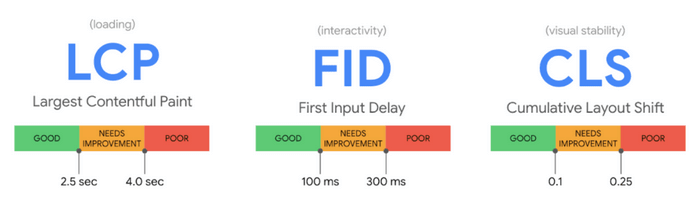
Three metrics make up Google’s Core Web Vitals:
- Cumulative Layout Shift (CLS) — Determines a website’s visual stability.
- Interaction To Next Paint (INP) — Shows how responsive a website is.
- Largest Contentful Paint (LCP) — Quantifies your website’s loading performance.
Let’s explore each of these metrics in more detail.
The Importance of Visual Stability
Visual stability is an extremely important indicator of the quality of the user experience on any website. Visitors who navigate your site expect the elements to stay in place largely.
Sudden movements—or “layout shifts,” as they are sometimes called—will significantly worsen the user experience.
For instance, let’s imagine you’re running an e-commerce website. A person creates a large order but they don’t intend to go through with the purchase. However, just as they click the Cancel button, the website suddenly shifts, and they accidentally confirm the order.
The result is a furious customer who has to endure a huge ordeal to get a refund. Sure, they were technically converted—but at what cost? They are guaranteed to spread negative thoughts about your website across social media and other online forums.
In the long run, it doesn’t pay to have a visually unstable website — especially because most errors won’t result in an accidental purchase. In most cases, your bounce rate will increase because visitors simply leave the website furious.
Why Does Visual Instability Happen?
So, how do “jittering” and other types of unexpected visual shifting happen in practice?
Your visual page content might move unexpectedly if the resources on your page don’t load simultaneously. There are other reasons as well, such as:
- Fonts that appear smaller or larger than expected.
- Videos or images with unspecified dimensions.
- Dynamically resizing third-party content.
Web developers know there are always differences between how users experience a website in practice and how it “behaves” in development.
What Does Cumulative Layout Shift (CLS) Measure?
Ultimately, Cumulative Layout Shift (CLS) shows how often unexpected visual shifts happen for the average website visitor.
So, what’s a good CLS score? Generally, websites should have a 0.1 or lower CLS score. On the other hand, a score higher than 0.25 means you need to do a lot of work to improve your site’s visual stability. Scores beyond that are considered abysmal.
Why Does Perceived Page Load Speed Matter?
Measuring page speed in “laboratory” conditions is one thing, but you must know how a page “behaves” in real time. In other words, you need to know if users perceive your website as slow or fast.
Generally, this isn’t a simple metric to measure. In the past, metrics like DOMContentLoaded were subpar representations of actual page speed because they didn’t accurately depict what users saw while visiting websites.
In other words, a page might have loaded, but users may have seen sluggish loading of certain (or all) elements for various reasons. Naturally, this was problematic. After all, page speed is only important from the user experience perspective.
These days, Google uses more user-centric quantifiers to gauge the quality of page speed. In recent years, various complex metrics have been used — but many of them were difficult to explain or inaccurate.
Currently, Google has settled on a relatively simple but crucial metric, LCP, as the central one for page speed.
What Does LCP Measure?
LCP determines when the main portion of content on your website (or rather, a page) has loaded. To do this, LCP basically determines when the page has rendered its largest element.
In practice, this means that your LCP score is the render time of the biggest piece of text, video, or image on the page. To make sure that this number is accurate in practice and not simply the result of a lab environment, LCP also counts:
- Redirect time.
- Connection setup time.
- Unloading from the page, the user was on before.
- Time To First Byte.
So, with all of this in mind, which LCP score should you aim for?
Your pages should have an LCP lower than 2.5 seconds for a decent user experience. That means most of your users get decent load speeds in practice, significantly increasing the quality of the user experience.
Remember, users frustrated with slow-loading pages are likelier to leave your website.
Why Does Responsiveness Matter?
Google tells us that 90% of the time a visitor spends on your page happens after all the content has loaded. Of course, this doesn’t necessarily need to be proven, as it’s quite intuitive.
Users will wait for content to load before interacting with a site in any significant manner — even though a large portion of that content is being loaded in the background.
Responsiveness matters because it shows that your page can quickly respond to user actions. On well-made websites, this responsiveness is visually apparent. In other words, the website will show visual feedback on the visitor’s actions.
A real-life example would be a change in the icon of a shopping cart after you add an item. That is a quick interaction, and the visual feedback from the page should appear almost instantly.
Of course, some user actions may take longer because they’re complex, but the page should still show some visual feedback to indicate the ongoing process.
In practice, the next frame being painted is your browser’s first opportunity to render this visual response to an action. That’s why we use Interaction To Next Paint as the metric to determine responsiveness.
What Does INP Measure?
This measure looks at all latencies of interactions during a visitor’s time on a page. The INP score is the longest observed interaction — once the algorithm clears away apparent anomalies.
Unlike previous scores, it’s not as easy to say that responsiveness metrics are just “bad” or “good.” High responsiveness is desirable, but expectations change across the devices visitors use to access websites.
When we account for the differences between mobile and desktop browsers, we arrive at some general rules of thumb. An INP score lower than 200 milliseconds indicates a decent level of responsiveness, while anything between 200 and 500 has room for improvement.
If your score exceeds 500, it’s time for major changes.
Conclusion
There are plenty of factors to consider when optimizing your website. However, Core Web Vitals are three important technical factors that show the quality of your website’s user experience.
Author Bio
Author bio: Vojin Dinic is an experienced onboarding and integrations manager at moverstech.com, a company specializing in software solutions for the moving industry. With a strong background in tech and logistics, Vojin brings unique insights into industry processes, which he regularly shares in his writing.