The best video edits of 2024 are clean, fast, caption-friendly, and built around viewer retention. The winning formula is simple: hook the viewer in the first three seconds, cut dead space without mercy, use motion with purpose, and export in formats that fit each platform.
TLDR: In 2024, the most effective edits combine tight pacing, AI-assisted cleanup, bold captions, smart sound design, and platform-specific framing. For example, a 45-second product video can often outperform a 90-second version if the first visual appears within one second and captions are placed above the lower UI zone. Many social teams now test three edits per video, and even a 12% lift in average watch time can mean thousands more completed views. Use tools like DaVinci Resolve, Premiere Pro, CapCut, Final Cut Pro, Descript, and Runway to speed up repeat tasks without making the video feel generic.
1. Retention Editing Is the Main Skill
The strongest video edits of 2024 are not always the flashiest. They are the ones people keep watching. That means every second has to earn its place.
Editors are cutting pauses, weak intros, repeated points, and slow transitions. The old “logo first, story later” format is fading. Viewers decide fast. If nothing useful or surprising happens early, they leave.
A strong retention edit usually includes:
- A visual hook in the first one to three seconds.
- Pattern breaks every few seconds, such as a zoom, cutaway, graphic, or angle change.
- Clear captions for silent viewing.
- Fast scene changes without making the edit feel chaotic.
- A payoff that arrives before viewers get bored.
This does not mean every video needs hyperactive cutting. A calm interview can still be tight. Remove the filler. Keep the breath when it adds emotion. Cut it when it adds nothing.
2. Captions Became a Design Element
Captions are no longer just accessibility support. They are part of the visual identity of a video. In 2024, top edits use captions as rhythm, emphasis, and structure.
The best caption styles are easy to read on phones. They avoid tiny text, thin fonts, and low contrast. Editors are using short caption chunks, usually three to seven words at a time. Key words get color, scale, or bold styling.
Still, restraint matters. It drives me crazy when every single word jumps, spins, and flashes. That makes the video harder to watch. Animation should support meaning, not scream over it.
Good caption rules:
- Use large type for vertical video.
- Keep captions away from platform buttons and usernames.
- Highlight only the words that matter.
- Match caption pace to the speaker’s tone.
- Check every auto-caption before publishing.
3. AI Speeds Up the Boring Work
AI editing tools are useful, but they are not magic. Their biggest value is removing friction. Editors use them for transcription, silence removal, rough cuts, background cleanup, object masking, voice isolation, and quick resizing.
Descript is strong for text-based edits. Cut a sentence from the transcript, and the video changes with it. Premiere Pro has solid speech tools and text-based editing. DaVinci Resolve offers smart masking, voice isolation, scene cuts, and strong color tools. Runway helps with generative fill, rotoscoping, and experimental shots.
The catch is that AI edits still need a human eye. Auto silence removal can chop up natural delivery. A dramatic pause may disappear. A laugh can get clipped. Expect to spend time fixing those choices, especially in interviews and testimonials.
4. Sound Design Is Doing More Heavy Lifting
Great video edits in 2024 sound expensive, even when they are made on small budgets. Editors are layering subtle sound effects under cuts, text hits, product moves, camera swipes, and title reveals.
You do not need a loud whoosh every two seconds. In fact, please don’t. The better approach is texture. A soft click on a UI close-up. A low hit before a reveal. A crisp riser before a transition. A tiny room tone bed under dialogue.
Good sound design makes cuts feel intentional. It also hides rough joins. If a speaker’s sentence has been cut heavily, a small ambient layer can make the scene feel smoother.
Pro tip: mix for the phone speaker first, then check headphones. Many viewers will hear your edit on a small speaker in a noisy room.
5. The Best Transitions Are Nearly Invisible
2024 editing trends favor motivated transitions. A whip pan works if the camera movement supports it. A match cut works if shape, motion, or color connects two shots. A hard cut works when the idea is strong enough.
Overused transition packs can make a video feel cheap. They also slow down editing. Honestly, waiting 10 extra seconds for a heavy transition preview to render is annoying when a clean cut would work better.
Use transitions for one of three reasons:
- To move time forward, such as from setup to result.
- To connect ideas, such as before and after shots.
- To create energy, such as in a trailer, reel, or music video.

6. Color Grading Is Cleaner and More Natural
The heavy orange-and-teal look is less common now. Many strong 2024 edits use natural contrast, clean skin tones, soft highlight rolloff, and brand-aware color.
DaVinci Resolve remains the favorite for serious color work. It gives editors deep control over skin, shadows, saturation, and shot matching. Premiere Pro is fine for quick grades, especially for social content. Final Cut Pro is fast for Mac-based editors who want smooth playback and simple organization.
For branded videos, color should match the message. A finance explainer may need cool, clean tones. A food video needs warmth and texture. A fitness reel may need contrast and punch. Don’t grade everything with the same preset.
7. Vertical-First Editing Is Now Standard
Vertical video is not just cropped horizontal footage. It needs its own composition. Faces, hands, products, captions, and graphics must sit in safe zones.
The best workflow is to plan for multiple outputs from the start:
- 16:9 for YouTube, websites, and presentations.
- 9:16 for TikTok, Reels, Shorts, and Stories.
- 1:1 or 4:5 for feed posts and ads.
CapCut is popular because it is quick, simple, and built for social edits. Premiere Pro is better for larger projects with many assets. Resolve is powerful when color, audio, and finishing matter. Final Cut Pro is still one of the fastest options for creators working on Apple hardware.
8. The 2024 Software Workflow That Works
A smart editing workflow saves hours. It also keeps revisions under control. Here is a practical setup:
- Ingest and organize: label footage by scene, speaker, product, or date.
- Create a transcript: use Descript, Premiere Pro, or Resolve.
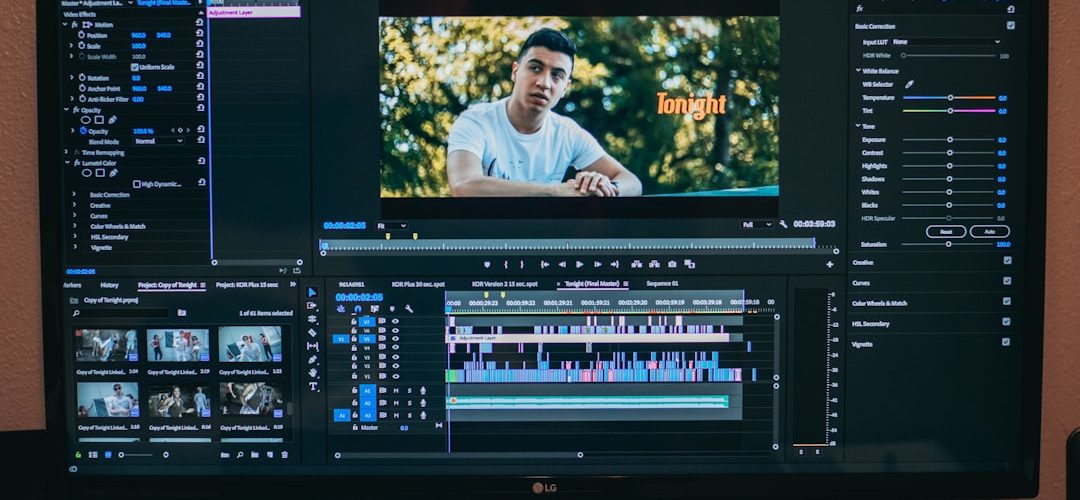
- Build the story cut: remove weak lines first.
- Add b roll: cover jump cuts and support key points.
- Design captions and graphics: keep them consistent.
- Mix audio: clean voice, music, and effects.
- Grade color: match shots before adding style.
- Export versions: make platform-specific cuts, not lazy crops.

9. Creative Trends Worth Using Carefully
Some 2024 trends are useful. Others are already tired. Use the ones that fit your message.
- Documentary-style ads: handheld footage, natural light, real people, less polish.
- Micro tutorials: one clear tip in under 30 seconds.
- Before and after edits: strong for beauty, design, fitness, home, and software.
- Split-screen comparisons: useful for product demos and reactions.
- AI-assisted visuals: helpful for backgrounds, concepts, and quick mockups.
The strongest edits still come from clear thinking. Know the audience. Know the point. Cut anything that gets in the way. Software can speed up the process, but taste decides the final result.
Best practice for 2024: make one polished master edit, then create shorter versions with different hooks. Test them. Watch retention, replays, saves, click-through rate, and comments. The best edit is not the one with the most effects. It is the one people finish, remember, and act on.