The best MP3 Paw alternative is the one that gives you safe downloads, clear rights, and fewer sketchy pop ups. MP3 Paw may sound quick, but music search sites can be messy. Many users now pick legal streaming or direct artist stores instead. Streaming made up 84% of recorded music revenue in the U.S., which shows where most listeners have moved [source: RIAA].
TLDR: If you want clean music access, try Spotify or YouTube Music for daily listening. If you want real downloads, use Bandcamp, Qobuz, or Amazon Music. For example, a student downloading 20 songs for offline study playlists will have a smoother time with Spotify Premium than chasing files through random sites. For free legal music, try Jamendo, Free Music Archive, or Internet Archive.
What Was MP3 Paw Used For?
MP3 Paw was known as a simple music search and download site. You typed a song name. You got results. You clicked and hoped the file worked.
Sounds easy, right? Not always.
The trouble is that sites like this often come with strange ads, broken links, fake buttons, and unclear copyright rules. Honestly, it feels like every “download” button wants to trick you into clicking the wrong thing. That gets old fast.
So let’s compare better options. Some are free. Some are paid. Some give you MP3 files. Others give you offline listening inside an app.
Quick Comparison Table
- Spotify: Best for playlists and everyday listening.
- YouTube Music: Best for rare tracks, remixes, and music videos.
- Apple Music: Best for iPhone users and high quality streaming.
- Amazon Music: Best for Prime members and simple downloads.
- Bandcamp: Best for buying tracks and supporting artists.
- Qobuz: Best for high quality paid downloads.
- SoundCloud: Best for indie artists, demos, and DJ sets.
- Jamendo: Best for free legal music and creator projects.
- Internet Archive: Best for old recordings and public domain gems.
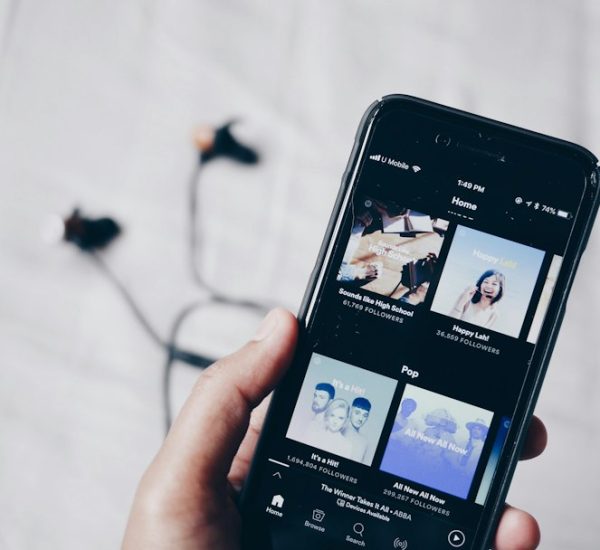
1. Spotify: Best for Most People
Spotify is the easy pick for daily listening. It has huge playlists. It learns your taste quickly. Its app is fast and clean.
You can download songs for offline listening with Premium. But here is the annoying bit. You do not get an MP3 file. The songs stay inside the Spotify app.
Best for: gym playlists, car rides, study music, podcasts.
Not great for: people who want actual MP3 files saved to a folder.
Verdict: Great for listening. Weak for file collectors.
2. YouTube Music: Best for Rare Songs
YouTube Music is great when you want the weird stuff. Live versions. Covers. Bedroom remixes. Songs that never reached big streaming apps.
It also works well if you already watch a lot of YouTube. The Premium plan removes ads and allows offline listening.
The catch is the app can feel cluttered. Music videos and songs mix together. Sometimes that is useful. Sometimes it is just noise.
Best for: remixes, live clips, hard to find tracks.
Not great for: clean album libraries.
Verdict: Fun, huge, and a little messy.
3. Apple Music: Best for Apple Fans
Apple Music works beautifully on iPhone, iPad, Mac, Apple Watch, and CarPlay. If you live inside Apple devices, it feels smooth.
It offers lossless audio too. That matters if you use good headphones. If you use tiny phone speakers, you may not notice much.
You can download music for offline listening. Again, these are app downloads. Not open MP3 files.
Best for: iPhone users, album fans, high quality audio.
Not great for: Android users who want the simplest setup.
Verdict: Polished and powerful, but best in Apple’s world.
4. Amazon Music: Best for Prime Members
Amazon Music is handy if you already pay for Amazon Prime. You may have access to a big music library without adding another full subscription.
Amazon Music Unlimited adds more songs and better control. Offline listening is available in the app.
It drives me crazy that Amazon’s plan names can feel confusing. Prime Music. Music Unlimited. HD. Family plans. Just tell me what I get.
Best for: Prime users, Echo speakers, family plans.
Not great for: people who hate account menus.
Verdict: Good value if you already use Amazon.
5. Bandcamp: Best for Real Downloads
Bandcamp is one of the best MP3 Paw alternatives if you want actual music files. Many artists sell albums and songs directly there. You can often choose MP3, FLAC, WAV, and more.
This is also one of the fairest choices for artists. You buy music. They get paid. Simple.
Some albums are free. Some use “name your price.” That means you can pay $0, $1, $5, or more, if the artist allows it.
Best for: indie fans, collectors, DJs, supporting artists.
Not great for: people who only want top 40 hits.
Verdict: The best legal choice for owning files.
6. Qobuz: Best for High Quality Downloads
Qobuz is for people who care about sound. A lot. It sells high resolution albums and tracks. It also has a streaming plan.
If MP3 feels too basic, Qobuz is a strong upgrade. You can buy music in formats that sound better than standard compressed files.
The downside is price. High quality albums can cost more. Also, the catalog may not feel as broad as Spotify for casual users.
Best for: audiophiles, hi fi setups, album buyers.
Not great for: quick free downloads.
Verdict: Great sound. More serious. Less casual.
7. SoundCloud: Best for New Artists
SoundCloud is still a fun place to find new music. Many artists post songs there before they show up anywhere else.
Some tracks have a download button. Some do not. That depends on the artist.
SoundCloud is great for electronic music, rap, demos, and DJ mixes. Quality can vary. That is part of the charm, but also part of the pain.
Best for: indie music, underground scenes, early releases.
Not great for: consistent audio quality.
Verdict: A discovery goldmine, but not always tidy.
8. Jamendo: Best for Free Legal Music
Jamendo focuses on music that is legal to stream or download. It is popular with creators, small video makers, and people who need background tracks.
You can find pop, rock, electronic, acoustic, and cinematic music. Do not expect every famous artist. That is not the point.
Best for: YouTube videos, school projects, indie playlists.
Not great for: chart hits.
Verdict: Safe, simple, and useful for creators.
9. Internet Archive: Best for Old and Public Domain Audio
Internet Archive is packed with old audio. You can find live recordings, radio shows, public domain music, and rare files.
It is not as slick as Spotify. Search can feel clunky. Expect to waste time on weird titles and dusty uploads. Still, you may find amazing stuff.
Best for: old recordings, history fans, public domain audio.
Not great for: modern hit songs.
Verdict: Strange, useful, and full of surprises.

So, Which MP3 Paw Alternative Should You Pick?
- Want easy music every day? Pick Spotify.
- Want rare remixes? Pick YouTube Music.
- Use iPhone all day? Pick Apple Music.
- Already have Prime? Try Amazon Music first.
- Want real MP3 downloads? Pick Bandcamp.
- Want the best sound? Pick Qobuz.
- Want free legal tracks? Try Jamendo or Internet Archive.
Final Pick
Bandcamp is the best MP3 Paw alternative for real downloads. Spotify is best for simple listening. YouTube Music is best for rare tracks. Jamendo is best for free legal music.
If you only remember one thing, remember this. Free is not always safe. Fast is not always legal. A clean app or artist store saves time, avoids sketchy clicks, and gives you music that actually works.