Most domain names sit in limbo. They’re either parked with generic ads or left on plain, forgettable pages that do nothing to inspire confidence. No story. No clarity. No clear way to buy. And as a result, no serious offers.
That’s a missed opportunity.
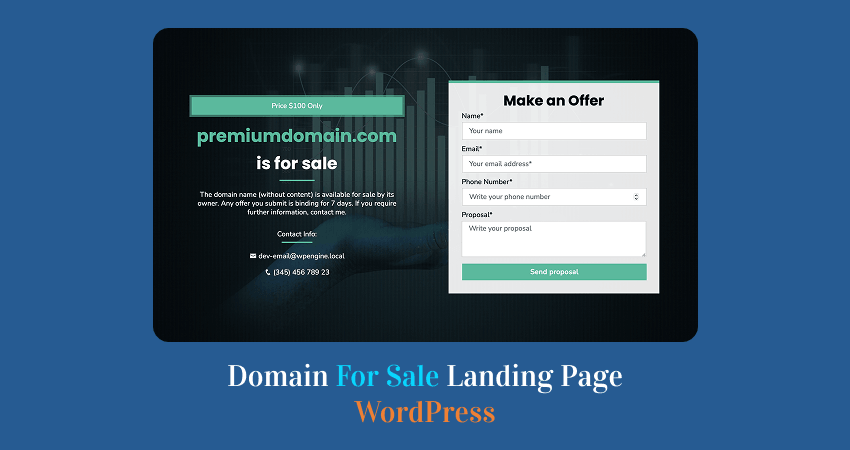
A domain for sale landing page WordPress setup changes the game completely. Instead of looking like an abandoned asset, your domain starts to feel intentional, valuable, and ready for business.
It gives potential buyers a clear message, a clean experience, and most importantly, an easy way to reach you or make an offer.
In this guide, we’ll go beyond theory.
You’ll learn what actually makes a domain sales page effective, and then follow a step-by-step process to build one in WordPress using a free plugin so you can turn your domain into something that works for you, not just sits there.
Why You Need a Domain For Sale Landing Page in WordPress
A domain on its own has potential, but without the right presentation, that potential can be easily overlooked.
Most domains are either parked with ads or left on basic placeholder pages. These pages look generic, offer little context, and rarely inspire confidence. To a potential buyer, they don’t signal value; they signal neglect.
A dedicated domain for sale landing page WordPress setup changes that instantly.
Instead of blending in with thousands of parked domains, your domain stands out as a deliberate, well-presented asset. A clean landing page gives it presence. It tells visitors this domain is actively being offered, not forgotten.
More importantly, it makes action easy. A well-designed page provides buyers with a clear path, whether that’s making an offer, reaching out, or learning why the domain is worth their attention. No guessing. No friction.
There is also the matter of control. When you rely entirely on third-party marketplaces, you are limited by their layout, their rules, and their competition. With your own landing page, you control the message, the design, and how your domain is positioned.
You can highlight what makes it valuable. You can decide how inquiries are handled. And you can build a direct connection with potential buyers without intermediaries.
In simple terms, a good landing page turns your domain from something passive into something active.
It doesn’t just sit there; it works.
What Makes a Good Domain For Sale Landing Page
A strong domain sales page does not need to be flashy. It needs to be clear.
When someone lands on your page, they should understand three things almost immediately: what domain is for sale, why it matters, and what they should do next.
If any of those pieces are missing, you risk losing attention before the conversation even starts.
A Clear Headline
Your domain name should be the first thing visitors notice.
Do not bury it under vague marketing copy or a clever but confusing slogan. If the domain is the product, then the domain should be the hero. A strong headline makes that obvious right away and removes any uncertainty about what is being offered.
A Simple Value Proposition
Once the visitor sees the domain, the next question is obvious: why is it worth anything?
This is where a short, focused value proposition matters. You do not need a long sales pitch. Just explain what makes the domain appealing.
It might be short, memorable, brandable, industry-specific, or easy to spell. The goal is to help the buyer quickly see the opportunity.
A Visible Call to Action
A good page should never leave visitors wondering what to do next.
Whether your preferred action is Make an Offer, Buy Now, or Contact Owner, it should be visible and easy to understand. The stronger the page, the less friction there is between interest and action.
An Easy Way to Reach You
Even a great domain page can fail if the contact process is clumsy.
Buyers should not have to hunt for your email address or guess how to inquire. A simple form, direct contact option, or dedicated inquiry section makes the page far more usable and makes serious interest more likely to turn into real leads.
A Distraction-free Layout
This is one area where less is almost always better.
A domain landing page is not a full business website. It does not need a busy menu, sidebar widgets, unrelated links, or extra clutter.
Every element that does not support the sale weakens the page. A clean layout keeps the focus exactly where it belongs: on the domain and the next step.
Now that we know what a good domain sales page needs, let us build one step by step in WordPress.
What You Need Before You Start
Before you build your domain sales page, make sure you have a few basics in place. Nothing complicated—just the essentials to get up and running smoothly.
- A domain name you want to sell – This is the asset you will be showcasing. Make sure it’s already pointed to your hosting.
- WordPress installed – Your site should be live and accessible. Most hosting providers offer a quick one-click install if you haven’t set this up yet.
- Admin access to your WordPress dashboard – You’ll need full access to install plugins, create pages, and adjust settings.
- A lightweight theme – Choose something clean and minimal. A simple layout helps keep the focus on the domain rather than unnecessary design elements.
- The free version of the Domain For Sale plugin – This will handle the core functionality, helping you create a clean, professional landing page without building everything from scratch.
Once you have these in place, you’re ready to build your domain for sale landing page step by step.
Step-by-Step: Create a Domain For Sale Landing Page in WordPress
Now let’s move from theory to action.
In this section, you’ll build a complete domain for sale landing page WordPress setup using a simple, practical workflow. Follow each step, and you have a clean, functional sales page ready to go.
Step 1: Log in to Your WordPress Dashboard
Start by accessing your WordPress admin area. Go to: yourdomain.com/wp-admin
Enter your login credentials and open the dashboard.
Before moving forward, take a moment to confirm a few things:
- Your WordPress site is connected to the domain you want to sell
- The site loads correctly when you visit the domain in a browser
- You have administrator access, so you can install plugins and manage settings
This step is simple, but important. Everything that follows installing the plugin, creating the landing page, and configuring your domain sale setup happens inside this dashboard.
Once you’re in and everything checks out, you’re ready to move to the next step.
Step 2: Install the Free Domain For Sale Plugin
You can install the free version directly from the WordPress plugin repository, or explore more features and examples on the official Domain For Sale plugin website.
With your dashboard ready, the next step is to install the plugin that will handle your domain sales page.
In your WordPress dashboard:
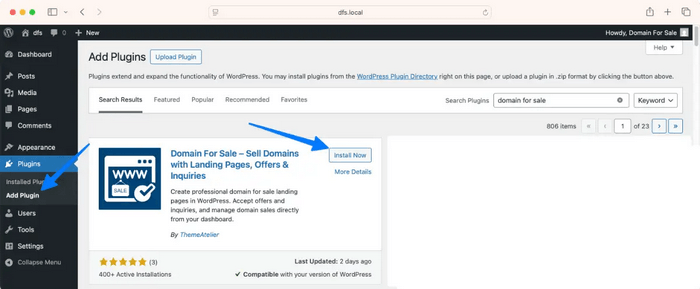
- Go to Plugins → Add New
- In the search bar, type “Domain For Sale”, or install it directly from the WordPress plugin repository.
- Find the plugin in the results
- Click Install Now
- Once installed, click Activate
After activation, the plugin will be available inside your dashboard, usually as a new menu item or settings panel.
The key advantage here is speed. Instead of building a layout from scratch or combining multiple tools, this plugin gives you a focused starting point designed specifically for selling domains.
And importantly, the free version is enough to get a clean, functional domain for sale landing page live—no paid upgrade required to get started.
Once the plugin is active, you’re ready to configure it and begin setting up your domain sales page.
Step 3: Add a New Domain Listing
Now that the plugin is activated, instead of going into generic settings, you’ll create your first domain sales entry.
In your WordPress dashboard:
- Go to Domain For Sale → Add New
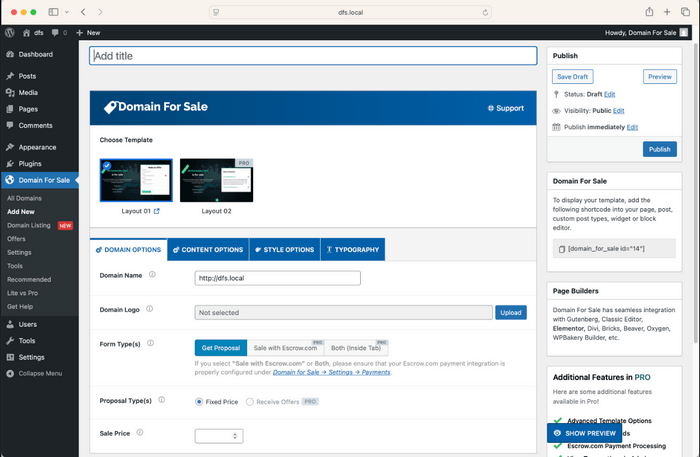
- You’ll be taken to a new screen where you can configure your domain landing page
This is where everything comes together.
At the top, enter your Domain Name (this becomes the main title of your landing page).
Below that, you’ll see the plugin interface with multiple sections like:
- Template selection
- Domain options
- Content options
- Style and typography settings
Think of this as your domain page builder—not just settings.
Step 4: Choose a Landing Page Template
Before adding content, select how your page will look.
In the Choose Template section:
- Pick Layout 01 (available in free version)
- Preview how the layout looks
- Keep the design clean and focused
The layout controls how your domain name, form, and call-to-action appear to visitors.
👉 Tip: Simpler layouts usually convert better for domain sales.
Step 5: Configure Your Domain Details
Now move to the Domain Options tab.
Here you’ll define the core information:
- Domain Name → Enter your actual domain (e.g., yourdomain.com)
- Domain Logo (optional) → Upload a logo if you have branding
- Form Type → Keep “Get Proposal” selected (free version)
- Proposal Type → Choose Fixed Price or leave default
- Sale Price → Add a price (optional but recommended)
This section defines how buyers interact with your domain.
Step 6: Add Your Sales Content
Next, go to the Content Options tab.
Here you control the messaging.
- Sale Title → Example: Premium Domain For Sale
- Sale Content → Write a short description explaining:
- Why the domain is valuable
- Who it’s ideal for
- Any key selling points
Keep it short, clear, and persuasive.
👉 You’re not writing a blog post—you’re selling an asset.
Step 7: Choose How to Display the Landing Page
This is an important step that makes your setup flexible.
Under Apply Landing Page With, you’ll see options like:
- Shortcode
- Replace Theme
Option 1: Shortcode (Recommended for beginners)
- Copy the shortcode (e.g., [domain_for_sale id=”12″])
- Create a new page (Pages → Add New)
- Paste the shortcode into the page
- Publish the page
Option 2: Replace Theme (Advanced / Cleaner setup)
- Select Replace Theme
- This will make your domain landing page replace your entire site layout
👉 Best if you want a pure domain-for-sale experience without any theme distractions.
Step 8: Publish and Preview Your Landing Page
Now:
- Click Publish
- Open your domain in a browser
- Review how the page looks
Make sure:
- The domain name is clearly visible
- The form works properly
- The layout looks clean on both desktop and mobile
Step 9: Test the Contact or Inquiry Flow
Before you consider your page done, test it as a potential buyer would.
Submit a test inquiry using your own form and make sure everything works as expected. Check that the message is delivered to your email and that there are no delays or missing fields.
Also check into the offers menu of the plugin, where all submissions will be stored with many essential informations.
Then review the page on both desktop and mobile. Pay attention to how the form looks, how easy it is to use, and whether any buttons or inputs feel confusing.
This step is easy to skip, but it matters. A great-looking page means nothing if a serious buyer tries to reach you and can’t.
Step 10: Fine-Tune the Page for Better Conversions
Once everything is working, take a few minutes to refine the experience.
Start by tightening your content. If any section feels too long or unclear, simplify it. Your goal is clarity, not volume.
Make sure your main call-to-action stands out. Whether it’s “Make an Offer” or “Contact Owner,” it should be obvious and easy to find.
Look at your page layout with fresh eyes. Remove anything that distracts from the domain itself—extra text, unnecessary elements, or visual clutter.
Finally, check how the page feels on mobile and consider adding subtle trust signals, like clear contact intent or wording that signals serious inquiries.
Small improvements here can make a big difference in how your domain is perceived and how often visitors take action.
Best Practices for a Higher-Converting Domain Sales Page
Once your page is live, the real goal isn’t just to have a presence, it’s to get results.
A well-built page gives you the foundation. These best practices help you turn that foundation into something that actually attracts interest and converts visitors into inquiries.
Keep the design simple
Your domain is the product, not the design.
Avoid the temptation to over-style the page or add extra elements that don’t serve a purpose. A clean layout makes your domain feel more premium and easier to understand at a glance.
When in doubt, remove rather than add.
Focus on one action
Every strong landing page is built around a single, clear action.
Decide what you want visitors to do:
- Make an offer
- Contact you
- Buy now
Then make that action obvious and easy. Multiple competing actions can create hesitation, which often leads to no action at all.
Make the domain look valuable
Presentation shapes perception.
Use short, confident wording to highlight what makes your domain worth attention. This could be its brandability, simplicity, niche relevance, or memorability.
Avoid exaggeration, but don’t undersell it either. The goal is to help buyers quickly understand why the domain matters.
Make contact easy
If someone is interested, they should be able to reach you immediately.
Don’t hide your contact option or make the process complicated. A simple form or clear inquiry section removes friction and increases the chances of receiving real offers.
The easier it is to reach you, the more likely people will.
Test on mobile
A large portion of visitors will view your page on their phones.
Check how your page looks and behaves on smaller screens. Make sure the text is readable, buttons are easy to tap, and the form is simple to complete.
A smooth mobile experience can make the difference between interest and action.
Common Mistakes to Avoid
Even a well-built page can underperform if a few key details are overlooked. These are some of the most common mistakes that can quietly reduce your chances of getting inquiries, and how to avoid them.
Using a Cluttered Theme
A busy design works against you.
Too many elements, menus, widgets, and animations pull attention away from the domain itself. Instead of looking premium, the page feels noisy and unfocused.
Keep it clean. The simpler the layout, the stronger the impact.
Writing Too Much Text
This isn’t a blog post—it’s a sales page.
Long paragraphs and unnecessary details can overwhelm visitors and dilute your message. Most buyers just want to understand what the domain is and why it’s valuable.
Say what matters, then stop.
Not Showing a Clear Call to Action
If visitors don’t know what to do next, they won’t do anything.
Your call to action—whether it’s Make an Offer, Contact Owner, or Buy Now—should be visible without scrolling and easy to understand.
Clarity here directly affects conversions.
Forgetting To Test The Inquiry Form
A broken form can cost you real opportunities.
Always test your inquiry flow after setting up the page. Submit a test message, confirm it reaches your inbox, and make sure all fields work as expected.
If buyers can’t contact you, the page fails, no matter how good it looks.
Leaving The Page Off The Homepage
Your domain should lead directly to your sales page.
If someone types your domain into their browser, they should land on the “for sale” page immediately. Sending them somewhere else creates confusion and increases the chance they will leave.
Set your landing page as the homepage for the best results.
Making The Page Look Like a Generic Parked Domain
Generic equals forgettable.
If your page looks like every other parked domain with ads, filler text, or no clear branding, it won’t stand out. Buyers are more likely to engage with a page that feels intentional and professionally presented.
A small amount of effort in presentation can make a big difference in perceived value.
FAQ
How Do I Create a Domain For Sale Landing Page in WordPress?
You can create a domain for sale landing page WordPress users rely on by setting up a simple page and using a dedicated plugin.
Install a plugin like Domain For Sale, add your domain details, choose a layout, and display the page using a shortcode or by replacing your theme. Once published, visitors who type your domain will land directly on your sales page.
Can I Sell a Domain Directly From My WordPress Site
Yes, you can.
A WordPress site allows you to present your domain professionally and collect inquiries or offers directly. As long as your landing page includes a clear call to action and an easy way for buyers to contact you, you can handle the entire process without relying solely on marketplaces.
Do I Need a Paid Plugin To Create a Domain Sales Page?
No, you don’t.
A free plugin is enough to create a clean and functional domain sales page. You can display your domain, add a short description, and enable a contact or proposal form—all without upgrading. Paid features may offer more customization, but they’re not required to get started.
Should I Use a Marketplace or My Own Landing Page
You can use both, and many domain owners do.
Marketplaces help you reach a wider audience, while your own landing page gives you full control over presentation, messaging, and leads. Having your own page also allows you to capture direct inquiries without competing listings or platform limitations.
Final Thoughts
If you want to sell a domain, presentation isn’t optional—it’s part of the value.
A domain that sits on a generic parked page feels passive. A domain presented through a clean, focused WordPress landing page feels intentional, credible, and ready for business. That difference alone can change how buyers perceive it—and whether they decide to reach out.
The good news is you don’t need a complex setup to make that happen. With a simple structure, clear messaging, and the free version of the Domain For Sale plugin, you can create a professional domain sales page in a short amount of time—without stitching together multiple tools or writing custom code.
Keep it simple. Make the next step obvious. And most importantly, make it easy for interested buyers to take action.
Because at the end of the day, the goal isn’t just to list your domain—it’s to sell it.